top of page

Martin Wetischek
Tech Artist / Tech Designer


Spellgazer
Top
Lead Programmer - Tech Art - Gameplay Programming - DevOps
Unreal Engine 5.3
Rubika Valenciennes, 2023-2024
Spellgazer is a systemic, physics based puzzle game where you play a wizard climbing a mountain and exploring ancient ruins to bring back magic to the world. You must cast spells to create objects or affect their properties, observe the resulting interactions, and exploit them to your advantages to progress.
Tech Art
My Tech Art work on Spellgazer consisted in tools programming, procedural generation, runtime simulation, optimization and some in-engine rigging.
The jury build runs at a consistent 60fps on high settings on an RTX 3080, and latest version on an RTX 3060. I am in the process of improving performances, targeting for 60fps on steam deck with Lumen, Nanite and Virtual Shadowmaps disabled.
In this section you can find information on all the tasks, features and tools I were responsible for.
Water Tools
The mountain in spellgazer features several water bodies, so I made a water system and set of editor tools for interacting with it.
This system allows for creation of water bodies, control of the flow direction and intensity, and spawning foam on those water bodies. All of the water data is accessible from any material or niagara system, allowing for environment materials to be wet near the water, and for some runtime simulation to be done on the water.
Flow / Foam painting
I made a paint tool using Unreal's new Scriptable Tools API for directly painting the flow and foam data in the level editor. Various parameters are available for the paint brush. All of the painted water data is saved to a texture, which is copied to a render texture at runtime so that any material, niagara system, etc can access it.
Foam Simulation
Using Niagara I made a runtime foam simulation that spawns foam based on the artist painted mask, as well as wherever the player or physics objects interact with the water. The foam contributed by the player / physics objects is based mainly on the difference between the flow velocity and object velocity, meaning a stationary object in flowing water will contribute foam and vice versa. The foam then gets carried along the flow vectors, and dissipates over time.
Dynamic Foliage
Using Niagara I made a volume that contains pseudo "wind" forces applied by the player and physics object. Our master foliage material reads that volume and bends the foliage in the direction of these forces. The wind forces dissipate over time, allowing foliage to slowly get back to its original rotation when nothing is currently influencing it.
Character Rig
Using Control Rig, I added IK to the player character's legs and pelvis, allowing him to adjust his position according to the geometry underneath him independently of gameplay collisions. I also added spring physics to his pauldron and the accessories on his belt.
Blockout Tools
Using Geometry Script I made various blueprints that let you quickly create 3D shapes like linear or curved stairs, cylinders, pipes, polygonal shapes, etc. They can be baked to static meshes for inclusion in builds (although they are primarily design for blockout). Two Editor Utility Blueprints allow for batch baking / clearing several blockout shapes at once in a couple clicks.
Environment Spline Tool
I made a spline based tool to spread and deform meshes along a spline. You can define a start, end, and looping segment mesh and materials.
The tool doubles as a path tool, when using a plane mesh and giving it runtime virtual textures to draw in.
The blueprint passes data about the path to each segment's material through custom primitive data, allowing for materials to do fade out effects on the beginning/end of the path, as well as evenly tiling their texture along the length of the spline regardless of segment count and length.
Gameplay Programming
My Gameplay Programming work consisted in programming the main game-wide systems, The spells used to interact with them, and some components used to compose secondary game mechanics.
In this section you can read more about various gameplay systems and how they were implemented.
Foundations
Most spellgazer systems rely on a few specific unreal features in order to scale well, be easy to customize and have no dependency on eachother while still interacting in gameplay :
- Gameplay Tags : These are tags defined outside code by programmers or designers. They can be applied to an actor by gameplay code, and events can be triggered when arbitrary tags are added or removed, or when complex multi-condition queries are fullfilled.
Multiple systems can apply the same tag to an actor and it'll stack, avoiding potential logic conflicts. Tags can "inherit" from other tag to define "tag categories", ie a base "stun" tag can be defined with multiple childs like "Stun.Sleep" or "Stun.Paralized" allowing for systems to be aware that a character is stunned without having to know about all the different stun types.
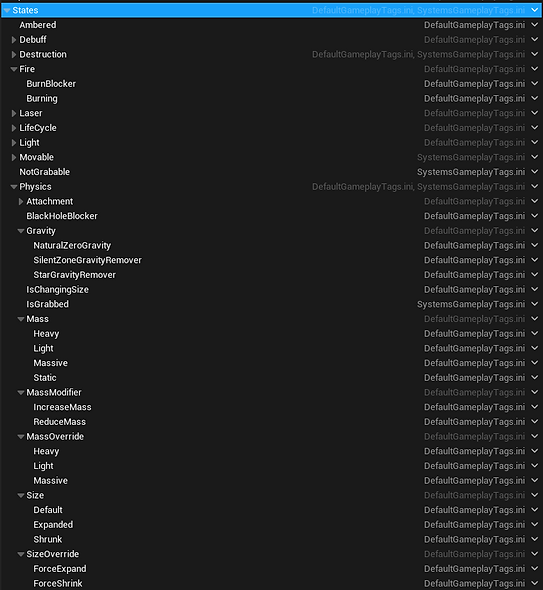
- Gameplay Events : These are events defined as gameplay tags, rather than directly in the code. Any piece of gameplay code can trigger a gameplay event on an actor, taking a tag as the event to trigger. They can also wait for a gameplay event corresponding to a gameplay tag to be triggered and react to it. The tag can be made a parameter, meaning any component set up to use gameplay event can be made to trigger or react to any arbitrary gameplay event without changing its code, ie an actor sensor can be made to trigger an explosion component without either of them knowing about eachother.


- Gameplay Abilities : These are blueprints representing an action the player can take, with a beginning and end, taking place over a single function call or an arbitrary period of time. They can indirectly block other abilities from being triggered while active, using tags as categories of abilities to block. These are mainly used for spells.

- Gameplay Cues : These are blueprints meant to contain logic managing VFX/SFX for an arbitrary event, be it instantaneous or active over an arbitrary period of time. These are triggered when gameplay code call for a gameplay corresponding to a gameplay tag, and allow for dedicated VFX code without polluting gameplay code.


Main Systems
Spellgazer has several main systems that affect all gameplay actors other than the player, and are implemented as cpp components present on a base gameplay actor class. They all work off of parameters set in a common data asset called GlobalPhysicsData, as well as per-instance parameters that can be overriden.
These systems are the following :
Size
The size of an object at any given time is one of 3 different size states, internally called Default, Expanded and Shrunk.
The size of an object is determined by its starting size state which is set per actor, an internal "offset" int which can be increased or decreased by triggering specific gameplay events, and the presence or absence of size override tags which force the size of an object to a specific state when applied.
Whenever an actor's size state changes, the actor's scale will change every tick towards its new target scale at a constant speed until the target is reached, at which point ticking will be disabled.
The size tag corresponding to the current state is applied to the actor, allowing for other systems to react to the actor's current size, and changes in size.


Mass
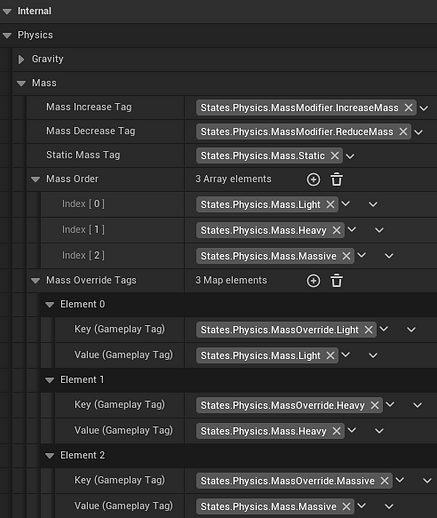
Similarly to size, mass operates based on states that actors change between based on their default mass (light, heavy, massive, as well as a unique "static" mass tag for static actors), tags that can increase or decrease the mass to different states, and tags that override the mass altogether to force a specific state. Changing an actor's size will increase or decrease its mass.
The tag corresponding to the current mass state is also applied to the actor.

Gravity
A relatively simple system, continuously applies an arbitrary gravity force to an actor, and gets disabled whenever any gravity blocker tag is present on an actor.


Life Cycle
Handles the death of an actor, caused either by a tag query being fullfilled or by an event being triggered on the actor, both of which can be changed per actor. Will either destroy the actor or simply apply a tag on "death" (currently all actors are destroyed), and trigger a gameplay cue handling various death VFX.

Spells
Spells are how the player interacts with the world. They are divided into 2 categories :
- Creation Spells, which spawn an actor wherever the player aims provided some conditions are fullfilled.
- Event spells, which trigger a gameplay event on a targeted actor, also based on some conditions.
There is also a third spell that does not fall into either category because of how complex it is, but still shares logic with them.
Creation spells
The two creation spells are Star and Raise Earth.
Star is used to create a star in air or on solid ground. This star will by default attract light actors. It can be expanded to attract heavier actors and burn any burnable actor, or collapsed to turn into a supernova and explode.
Raise Earth will spawn a rock pillar on any stable, natural ground or wall. That pillar can be used as a platform, to push physics actors around, and can be destroyed by a supernova.
The player can only create 2 actors at any given time, creating a 3rd will destroy the first object he created.
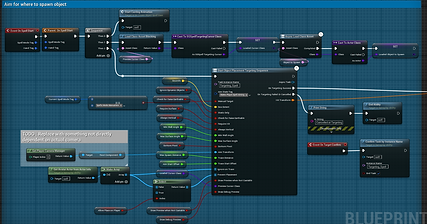
Both spells inherit from the same base spell class, CreateObjectSpellBase, which handles the targeting sequence during which the player aims for wherever he wants to spawn an actor, spawn the actor should an appropriate spot be found, and play spell casting animations on the character.
Parameters are defined to handle the minor differences between types of object to spawn, like the requirement for "stable" ground (detected by doing several raycasts towards the aimed surface and calculating the difference in normal at different point), whether or not to rotate the actor when spawning on a wall or on the ground, etc.
The spell will only load the actor it's going to spawn, the "cursor" actor used to visualize targeting, and the spell casting animation when needed.


Event Spells
The two event spells are Expand and Collapse.
Expand is used to increase an actor's size, Collapse to reduce it.
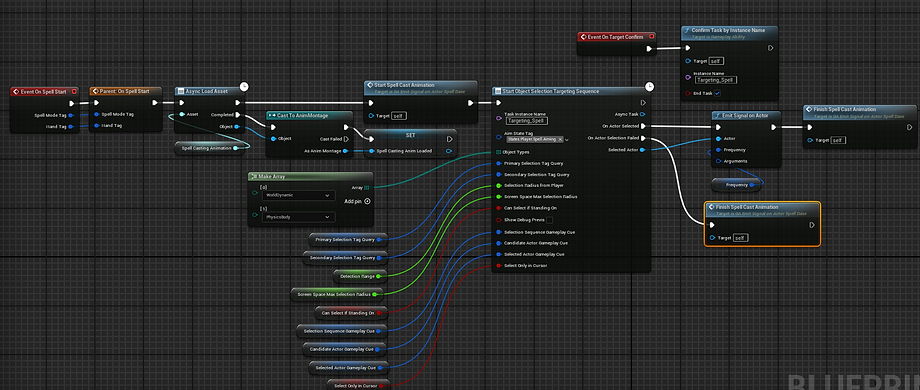
They both share a very simple base spell class, EmitSignalOnActorBase.
This class handles the targeting sequence, during which it will try to find an actor fullfilling several conditions (distance from the player, visibility, a tag query, whether or not the player is standing on the actor), and simply trigger an arbitrary gameplay event on the actor selected.
While only used for those two spells, this is arguably a very powerful base class, as it can be used to make spells that trigger any event on any actor without any code change, including events already used by existing systems to interact with eachother. For example if you have actors that explode in response to arbitrary events, you could make a spell that lets the player make them explode on command.


Magnetism
The one spell to not share a base class with any other spell.
Magnetism is used to grab physics actors, rotate them, move them around and throw them.
It's the only spell to have multiple states (targeting, holding an actor), and inputs to further control it while it's active.
It uses the same targeting node as event spells to find an actor to grab, then grabs said actor using PhysicsHandle, a default unreal component that applies corrective forces to an actor to try to hold it at an arbitrary position and rotation.
Manual rotation, pushing, pulling and throw are triggered using gameplay events fired on the player actor, allowing magnetism to accomplish this very complex behaviour with pretty much no dependency to anything else in the project.


Other
Things I did that don't necessarily warrant their own sections :
Tech Art :
- Monitoring performance in detail using the GPU Visualizer, Unreal Insights profiler and RenderDoc to directly identify the main performance bottlenecks as they appear in practice (Objective is 60fps on max settings on RTX 3080, side objective is reaching 60fps with lumen disabled on steam deck)
- Overhauling materials to reduce instruction costs, reduce virtual shadowmap invalidation, disable features based on graphics settings, add features like landscape blending via RVT
- Going over all lights in the game to disable unnecessary shadows and reduce performance cost where it can be done without reducing quality
- Made a Houdini based procedural mountain generator for vistas
- Made some VFX like the star creation ground preview decal, updated some existing VFX like the expand/shrink object preview
DevOps :
- Set up Perforce source control for the project, Jenkins for automated cpp binaries build and nightly project packaging, Discord bot for build state information and link to latest packaged build
Credits :
Art Director & Character Artist : Violaine Dedieux
Technical & VFX Artist : Lowenn Berthet
Environment Artist : Carmelo Dott
Lead Programmer & Technical Artist : Martin Wetischek
Gameplay Programmer : Gautier Debreu
Gameplay Programmer : Aimie Hardy
Lead Game Designer & Level Designer : Raphael Pelletier Palumbo
Game, Narrative & Level Designer : Ambre Cogné
Producer : Matthieu Bouffini
bottom of page